
Nightlife
Generate 36 photos with Nightlife, covering the complete set of scenes and variations included in this Photo Pack. Your selected AI model is used whenever a scene calls for a person.
Run the complete Nightlife AI photo shoot from your laptop or phone. Build an identity once, then place the same person into every distinct scene in this Pack.
The actual model, quantity, and Credits are fixed before a paid task is submitted.
A trained identity stays connected across Camera, Photo Packs, and follow-on edits.
Task requests, state, settlement, and eligible failure refunds stay auditable.


Upload your selfies and start your Nightlife shoot
Build an identity from everyday references, then move that same person into every Nightlife direction.


Multi-person support for believable photos together
Bring rights-cleared references for each person into one photograph with coherent light, perspective, and interaction.


Create your own AI identity model
Upload 5–16 clear, varied photos of one identity; use 15–16 for high resemblance. Training runs in the background, then the model becomes reusable across Camera and Photo Packs.
Create an identityOr create a synthetic AI influencer
Define an original persona and visual direction, then use the same workspace to build an ongoing library of photos, videos, and brand content.
Design a personaAny pose, any place, any camera direction
Describe the frame directly. MeStudio.ai validates request shape, rights, Credits, and files without rewriting your Prompt before it reaches the selected model.
Open AI Camera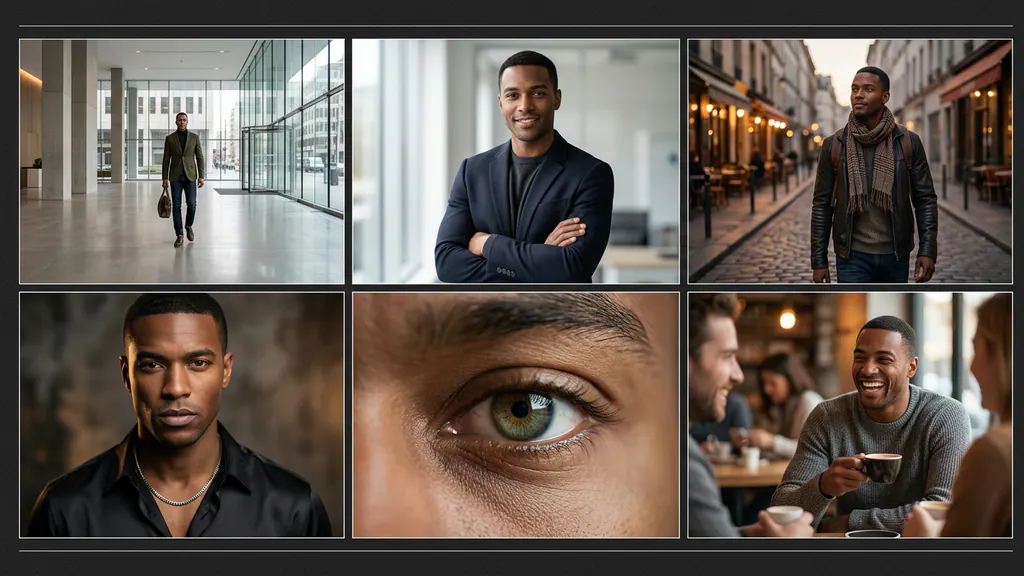
Turn a still photo into a short video
Start from a frame you love, then direct camera motion, action, and pacing into a continuous clip.
Create AI videoReference-driven motion and continuity
Where supported, add image, video, or audio references so identity, action, and camera intent stay clearly directed.
Explore video workflowsTry on new wardrobe directions
Upload a clothing reference you have rights to and preview new styling while preserving the person and pose.
Open clothes changerFrequently asked questions
How many photos does this Pack create?+
The current version contains 36 results across 9 ordered photo directions.
Do I need a ready identity first?+
Scenes that need a person require a ready identity you are authorized to use. Identity-free scenes follow their own input contract.
Are Credits charged before I review the Pack?+
No. The server verifies plan access, model capability, and final cost first. Tasks and reservations start only after you confirm the quote.
What happens if one shot fails?+
Each image is an independent child task. Successful results are stored normally; failed child tasks refund independently.
Are my generated results public?+
No. Results are private by default and only appear publicly after an explicit Publish action.
Can I run the full Pack on mobile?+
Yes. You can review inputs, confirm the quote, and follow each shot from mobile or desktop.
Can I continue with video or try-on?+
Supported results can continue into video, Mocap, try-on, or Remix. Every step revalidates capability and receives a separate quote.
Where can I review the photo directions?+
The ordered directions for this version appear below this FAQ. Execution uses the pinned version snapshot.
What is a Photo Pack?+
A Photo Pack is a versioned set of ordered photo directions. It runs as independent shots so each result, charge, failure, and refund remains auditable.
Can I preview a Pack before running it?+
Yes. Public Pack pages show approved examples, direction titles, output count, and format without exposing the private execution prompt.
Can I add my own Prompt?+
Use Camera for a custom Prompt. A Photo Pack keeps its approved ordered directions pinned to the selected publication version.
Does MeStudio.ai rewrite my Prompt?+
No. Enabled generation paths send your Prompt to the selected model verbatim. MeStudio.ai only validates the request shape, files, ownership, plan access, and Credits.
How does MeStudio.ai select an AI model?+
Each enabled capability uses a verified model that satisfies its input and output contract. A capability stays disabled until that contract is verified.
Can the Provider or model change after I confirm?+
No. The quote and task snapshot pin the model capability used for that request.
How long does a Photo Pack take?+
Timing depends on shot count and generation queue time. Every child shot reports its own queued, running, completed, failed, or reconciliation state.
Where can I track a running Pack?+
Open Projects or the Pack run view to follow the parent run and every child shot.
Can I close the browser while a task is running?+
Yes. Accepted work runs in the background and remains attached to your account and project.
Can I retry a failed shot?+
Retry creates a new auditable attempt. The original failed or refunded attempt remains immutable.
What prevents duplicate submissions?+
Submission and Provider callbacks use idempotency keys. Repeated delivery cannot create a second charge or a second result for the same attempt.
Can I download the original result?+
Completed assets remain connected to their stored original and responsive derivatives. Open the image detail view to use the available download action.
How are results organized?+
Results stay connected to the source Pack run, project, identity, Provider request, and any later edit or video derived from them.
Can I reuse a Pack result in another tool?+
Yes. Supported results can continue into Remix, video, motion capture, try-on, product holding, editing, or export flows.
Can I combine two photos?+
Use Combine photos with two owned source images. The quote records both source relationships before submission.
How does Remix a photo work?+
Choose a source image, provide the supported inputs, review the quote, and confirm. The new asset keeps its source lineage.
Can I change or remove a background?+
Use the verified background or editing capability that matches the requested action. The source image remains private and linked to the output.
Can I remove an object from a photo?+
Object Remover accepts the required source and mask inputs, validates their dimensions, and quotes the task before execution.
Can I upscale an image?+
Image Upscaler derives the quote from stored source dimensions and preserves the source relationship on the upscaled result.
Can I restore an old photo?+
Photo Restoration is available through its verified model capability and keeps the restored output private by default.
Can I colorize a black-and-white photo?+
Photo Colorizer uses a dedicated verified path. It does not replace the original asset.
Can I use Face Swap?+
Face Swap requires owned source images and explicit identity consent. Both inputs remain recorded in the output lineage.
How does virtual try-on work?+
Select a person image and a clothing image you have the right to use. MeStudio.ai validates both inputs and shows an independent try-on quote.
Can a person hold a product in a generated photo?+
Hold a product uses the verified person-and-product path when the selected inputs satisfy its contract.
Can I turn a finished photo into a video?+
Yes. Open Make a video from a supported image, choose the available duration and frame, then review the separate video quote.
Can MeStudio.ai create a talking video?+
Only the verified speech or audio-driven paths shown in the workspace are enabled. Unsupported voice-changing or text-to-speech substitutions remain disabled.
What does motion capture require?+
It requires a supported person image, a rights-cleared motion clip, explicit consent, and a duration accepted by the pinned model capability.
Which file types can I upload?+
Each upload control lists the formats accepted by that capability. Unsupported or malformed files are rejected before any paid task is created.
Are there upload size and count limits?+
Yes. Limits are capability-specific and are checked on the server before quoting or task creation.
Can a scene contain more than one person?+
Only directions and model capabilities with verified multi-person support are enabled for more than one selected identity.
How many photos do I need to train an identity?+
The identity flow accepts 5–16 clear, varied, rights-cleared reference photos for one adult identity; 15–16 are recommended for high resemblance.
Does identity training spend AI Credits?+
Identity training uses the monthly model allowance included with the selected plan rather than the AI Credits balance.
When is an identity ready to use?+
It becomes selectable only after training completes, the artifact is persisted, and the ready state is stored successfully.
Whose likeness can I train?+
Only use your own likeness or an adult likeness you are authorized and able to confirm consent to use.
Can I delete an identity model?+
Use the identity model controls to request deletion. Related audit and billing records remain only where required for integrity and reconciliation.
How do AI Credits work?+
Credits are the internal unit used for quoted AI work. A confirmed quote reserves the required amount, then completion settles the actual task.
What is the difference between a plan and Credits?+
A plan controls feature access and recurring allowances. Credits pay for eligible AI execution after that access check passes.
Is the quote the final Credits amount?+
The server-owned quote pins the supported inputs and expected Credits cost before confirmation. Variable facts such as dimensions or duration come from stored files, not browser claims.
What happens to Credits when the generation service rejects a task?+
A known pre-acceptance or execution failure enters the audited exact-once refund path. Ambiguous accepted requests are quarantined for reconciliation instead of risking a double refund.
Can I upgrade or downgrade my subscription?+
Open Billing to view the available plan-change action for the active Stripe subscription.
How do I cancel my subscription?+
Open Billing and use the subscription management action. Cancellation changes future renewal and does not fabricate a completed monetary refund.
Which payment methods are accepted?+
The checkout shows only payment methods currently enabled for the selected Stripe product and currency.
Where can I find a receipt or invoice?+
Use Billing and the payment-provider receipt associated with the settled order. Contact hi@mestudio.ai if the record cannot be located.
How do monetary refunds work?+
Monetary refund eligibility follows the published Refund Policy and is separate from automatic Credits refunds for failed AI child tasks.
Are my uploads and results private?+
Yes. Private source files and generated results require authenticated ownership checks. Public access is a separate explicit publication action.
How do I publish a result?+
Use the explicit Publish action on an eligible owned result. A saved or generated image is not public merely because it exists.
Can I delete my generated media?+
Move eligible owned media to Deleted, then use the available permanent-deletion flow subject to retention and audit requirements.
Does the full workflow work on mobile?+
Yes. Mobile layouts support Pack review, input checks, quote confirmation, task tracking, media detail, and the available follow-up actions without horizontal overflow.
Can I use MeStudio.ai in another language?+
Public and account surfaces use the locale selected by the site when a translated route and message set are available.
How do I report a problem?+
Include the task or Pack run identifier and contact hi@mestudio.ai. Never send an API key, full payment credential, or private training archive in a support message.
Pricing
Starter
Start with essential AI photos, train your first identity, and begin a focused creative workflow.
Get Started →Credits and model allowance issued monthly
- Get 200 AI Credits per month
- Create 1 AI Model per month
- 🍌 Nano Banana Pro
- Hyper Realism™
- Features:
- Low quality photos
- Low likeness
- Take 1 photo at a time
- Slow processing
- For personal use only
- For each model you create, you get 48 free photos (total 48 free photos) auto-generated:
- 8x free profile pics
- 8x free professional headshots
- 8x free dating app photos
- 8x free outfit ideas
- 8x free social media posts
- 8x free lifestyle stories
Pro
Create more portraits with higher throughput, flexible prompts, and commercial-ready tools.
Get Started →Credits and model allowance issued monthly
- Get 800 AI Credits per month
- Create 2 AI Models per month
- 🍌 Nano Banana Pro
- Hyper Realism™
- ← All Starter features, plus:
- Medium quality photos
- Medium likeness
- Take up to 4 photos in parallel
- ➡️ Import photos
- Write your own prompts
- Remix any photo
- Commercial use license
- For each model you create, you get 48 free photos (total 96 free photos) auto-generated:
- 8x free profile pics
- 8x free professional headshots
- 8x free dating app photos
- 8x free outfit ideas
- 8x free social media posts
- 8x free lifestyle stories
Max
Create more photos, models, and edits with faster parallel production for high-volume campaigns.
Get Started →Credits and model allowance issued monthly
- Get 1,300 AI Credits per month
- Create 5 AI Models per month
- 🍌 Nano Banana Pro
- ← All Pro features, plus:
- High quality photos
- High likeness
- Take up to 8 photos in parallel
- ✍️ Edit photos
- ✂️ Crop photos
- 🔍 Zoom out photos
- 🎬 Shoot AI videos
- 💡 Relight photos
- 🔃 Combine photos
- Use the magic upscaler
- Try on clothes
- Early access to new features
- For each model you create, you get 48 free photos (total 240 free photos) auto-generated:
- 8x free profile pics
- 8x free professional headshots
- 8x free dating app photos
- 8x free outfit ideas
- 8x free social media posts
- 8x free lifestyle stories
Ultra
Scale identity content with the highest queue priority, expanded storage, and production limits.
Get Started →Credits and model allowance issued monthly
- Get 2,700 AI Credits per month
- Create 10 AI Models per month
- 🍌 Nano Banana Pro
- ← All Max features, plus:
- Ultra quality photos
- Ultra-high likeness
- Take up to 16 photos in parallel
- Unlimited photo storage
- Priority: faster response times
- ♻️ Export your models
- For each model you create, you get 48 free photos (total 480 free photos) auto-generated:
- 8x free profile pics
- 8x free professional headshots
- 8x free dating app photos
- 8x free outfit ideas
- 8x free social media posts
- 8x free lifestyle stories